Tired of Heat Creep Ruining Your PETG Prints?
Struggling with PETG/ASA clogs on your Bambu Lab P1S/P2S? You’re not alone. The official “open door” fix ruins your enclosed printer’s benefits—letting in noise and fumes. The real issue is heat creep: stock cooling fails in a hot chamber, softening filament early. CoolDry Pro makes this simple: Blow Dry & Cool Air DIRECTLY on the heatsink
PLA Keeps Jamming the Moment You Close the Door.
Your printer can't handle its own enclosure when printing PLA. The chamber traps heat, the stock cooling fails, and your PLA softens before it even reaches the nozzle. Every clog wastes time, ruins prints, and costs you money in failed parts and filament.
Outdated Cooling vs. High-Speed Demands
Your trusted workhorse printers weren't designed for today's high-speed materials. Input shaping tech leads to inevitable heat creep and clogs. Upgrading every printer is costly. CoolDry Pro gives them a new lease on life.
Try COOL Dry Pro
Stop Fighting Your Printer, Start Mastering Your Prints.
How to Conquer Ambient Heat & Heat Creep ?
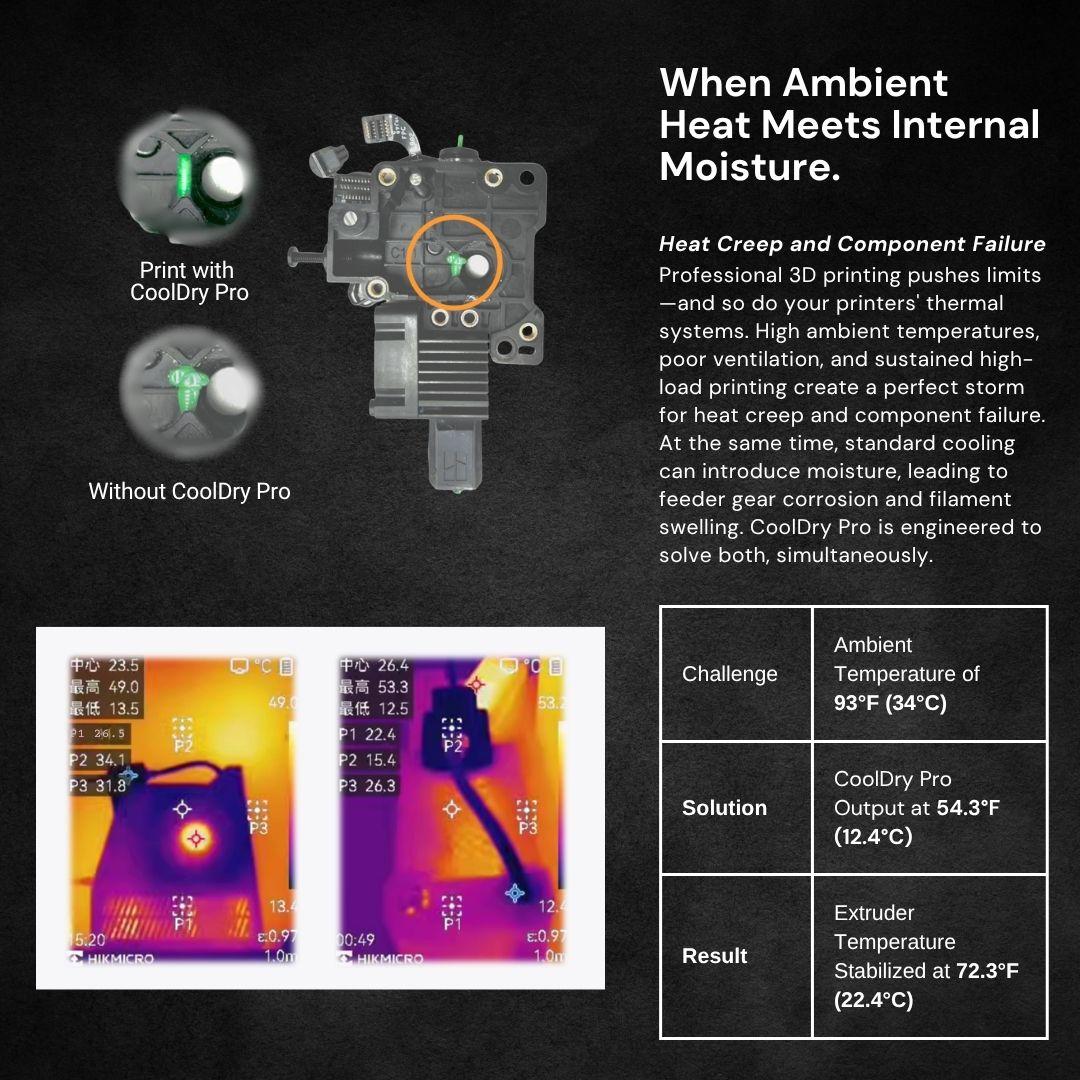
Actively cools the hot-end, preventing jams even in high-temperature environments (exceeding 33°C/92°F) or during marathon print sessions.
CoolDry Pro Output mostly from 50-64°F (10-17°C) and make extruder temperature stabilized at 72.3°F (22.4°C)
How to Optimize PETG/ASA Print Parts Quality ?
Safely print at the upper limit of your material's recommended temperature range. This maximizes layer adhesion and surface finish quality without the risk of heat creep. For instance, while standard PETG profiles typically print at 240°C (464°F), reaching 280°C (536°F) can yield significantly glossier surfaces and enhanced mechanical properties—a threshold now safely accessible with CoolDry Pro.
How to Boost Print Speed & Throughput ?
Printing faster generates more heat, demanding superior cooling. This is why high-flow materials like HF PETG are notoriously difficult to print—they push standard hotend cooling to its limits. Many print farms are forced to choose between slower, safer profiles or abandoning these materials altogether, capping their potential throughput.
Our Solution:CoolDry Pro's effective thermal management allows you to break this paradox. It enables increased print speeds without sacrificing quality, directly boosting your farm's output by unlocking the full potential of high-performance filaments.
Ensure Dry Filament Path
Maintains a dry, ventilated environment within the filament path, protecting moisture-sensitive materials from swelling at the feeder.
Why this matters: Even after drying, materials like TPU and PETG remain highly susceptible to ambient humidity. While sealed dry boxes (like a PolyDry) offer significant improvement, the printer itself is not a closed system. Water vapor can still travel up the Bowden tube and into the filament during printing, leading to moisture absorption and swelling at the feeder. CoolDry Pro actively combats this by creating a positive pressure of dry air within the path, significantly mitigating this critical point of failure.
Universal Compatibility & Simple Setup
Fits most externally-fed 3D printers using 1.75mm filament, which constitutes the vast majority of the market. Get up and running in under 10 minutes—no complex modifications required.
For optimal performance, the cold air outlet should be precisely directed at the heat sink. Misalignment, such as directing it primarily at the heat break, may reduce cooling efficiency. It's also worth noting that printers using 2.85mm filament are generally less prone to heat creep due to their higher thermal mass and lower pressure requirements. Consequently, while compatible, the perceived performance boost on 2.85mm systems may be less pronounced than on 1.75mm systems.
Call3D
CoolDry Pro - Aircooling Kit
3.75 / 5.0
(4) 4 total reviews
Couldn't load pickup availability
- 90-Day Warranty
- 30-Day Return
- 15-Day Delivery
🚚 More information regarding shipping & delivery
- Solves hot-end clogs from persistent overheating through active air cooling.
- Enables higher printing temperatures for PETG and other materials, enhancing print quality.
- Features easy installation and broad compatibility with most professional and desktop 3D printers.
Shoutout to the creator! I have an X1C, and I always print with the enclosure closed—PETG at 280°C and PVA at 240°C. I bought the two-year-old version of this extruder cooling setup a while back, and honestly, didn’t really notice a difference when using it.
That is, until I moved last month and forgot to bring the extruder cooler with me. Suddenly, every single print was clogging—*every time*. Then once I hooked the cooler back up? Problem solved, worked like a charm again.
Also, quick rant about Bambu Lab’s PETG HF: if the chamber temp gets too high, it clogs *so* easily. No wonder they ended up discontinuing it later!
Actually... When I saw that the Bamboo H2D Laser Version has a built-in air pump, I started thinking—what if we removed all the hotend fans and used a single large air pump for centralized air supply instead? We could just install a valve near the hotend to control it, and the response speed would probably be faster than with cooling fans too.
The first summer after buying my 3D printer, I ran into my first extruder clog. At first, I figured it was the new filament—maybe it was low quality. But then I tried the old filament, and the same thing happened. Taking apart the extruder was such a hassle. Finally, it hit me: maybe it was too hot? Sure enough, leaving the door open while printing fixed it. Since the printer was on the balcony, I didn’t mind leaving the door open at all.
Later, the company got one too. We couldn’t stick it on a balcony, though, and printing ABS reeked *so* bad. So we ended up buying a set [to fix that].
I bought one, plus a used pump set—got them cheap. I’m pretty excited to see how it goes. My P1P is insulated, and when printing ASA with a chamber temperature of 65°C, I often get clogs if the flow rate isn’t high enough, like when printing tree supports.

92°F (33C°) is our clog point ,turning a profitable day into a total loss.
Siaoya,a 3D Printing lab owner
BLOGs
-
Independent Review: Does It Really Fix Heat Creep?
See The Full ReviewWe invited an independent reviewer to test the cooler on his Bambu Lab X1 Carbon.
If you're battling jams with high-temperature filaments, this independent perspective is essential reading before you decide.
-
The CoolDry Pro Story: Born from Real-World Need
Discover the Full Story Behind the DesignAs the former Marketing Director at Raise3D, I saw professional users tackle heat creep with extreme measures—from rigging industrial air compressors to opening printer lids. These "hacks" proved a clear need for active cooling, but introduced noise, moisture, and complexity.
-
Customer Case Study
Read the Full Rescue StoryP1P Farm Reduced 80% Clog Rate → Achieved 95% Success Rate
Can't afford expensive AC power bills? CoolDry Pro delivers precise cooling at an extremely low power consumption, rescuing summer production.
FAQ
How noisy is the unit?
A: It generates a moderate operational noise level, measured at 48 dBA. In practice, this is quieter than the printing noise of popular printers like the Bambu Lab A1, P1, P2 and X1 series during operation.
Which printer models are compatible?
Fits most externally-fed 3D printers using 1.75mm or 2.85mm filament, It is designed for seamless integration with P1S, and X1C, which constitutes the vast majority of the market.
For optimal performance, the cold air outlet should be precisely directed at the heat sink. Misalignment, such as directing it primarily at the heat break, may reduce cooling efficiency.
What is the power adapter specification?
A:It uses a universal input power adapter (100V-240V) with a12V, 7A DC output.
How often does the condensate container need to be emptied?
Under typical conditions (e.g., 30°C/86°F, 80% humidity), the integrated container may fill in approximately 6-8 hours. For users planning extended, uninterrupted printing sessions, we include an adapter file in the package. This allows you to connect the system to a standard plastic water or soda bottle, significantly extending the drainage interval.
What is the warranty?
The complete system is backed by a1-year warrantycovering non-human-induced damage. Please note that the air pump and condensate filter cartridge are classified as consumables and are covered by a2-month warranty.
Does installation require any printer modifications?
No.CoolDry Pro is a true plug-and-play system. It requiresno permanent modifications or alterationsto your 3D printer.
What is the power consumption?
The unit consumes 60W. Even running continuously for 24 hours, it uses less than1.5 kWhof electricity.
Installation Guide
Become a Partner | Reseller & Volume Pricing Inquiry
Join our partner network to scale your business, or request volume pricing to maximize your print farm's ROI.