M2 / M2 Lite P2S Chamber Heater
Adjustable, Stable Temperature Control
Set the chamber temperature from 40–60°C (104–140°F), with listed temperature-control accuracy of ±1°C (±1.8°F), for more consistent heating that can help reduce uneven cooling and warping on ABS, ASA, and other shrink-prone prints.
Automatic Start/Stop with HEPA Filtration
IR toolhead sensing starts the M2 with printer activity and shuts it off in 3 mins. H13 HEPA filtration captures airborne particles, while activated carbon helps reduce odors and certain gaseous emissions, particularly when printing ABS.
13 in stock
The MartilloTech P2S chamber heater line fits the Bambu Lab P2S in two versions: the M2 with an H13 HEPA and activated carbon air purifier, and the M2 Lite without filtration. Both add active 40–60°C (104–140°F) temperature control to an enclosure that otherwise only holds heat from the bed, so ABS, ASA, PC, Nylon, and PA-CF parts see less uneven cooling, warping, and layer splitting.
The heater, mounting points, and controls are shared. IR toolhead sensing starts the unit when the toolhead moves and stops it after the listed 180-second delay once printing ends, with no Wi-Fi or app needed, and manual modes remain available. On the M2, the filtration module runs together with heating or alone in cold-air mode to capture particles and reduce odors during ABS prints; on the M2 Lite you get the same chamber heating with no filter to fill or replace.
Both versions use the existing P2S mounting points but require opening the rear panel and connecting internal power wiring, so plan a bench install and pick the 110 V or 220 V version that matches your supply. Keep heating off for standard PLA and PETG, and keep the room ventilated even when the M2's filtration is running.
ETA:
- 90-Day Warranty
- 30-Day Return
- 7-Day Delivery

M2 Chamber Heater for Bambu Lab P2S Overview
Why Choose the M2 Over Other P2S Heater Mods?
1. After installation, the M2 connects to the printer’s internal power wiring, so no separate external power supply is needed and the setup stays integrated.
2. IR sensing detects toolhead movement to track print activity. Unlike a bed-temperature trigger, which may keep heating while the bed remains warm after a print error stops the toolhead, this activity-based approach can help avoid unnecessary heating and power use.
Product Specification
- Product Type: Active P2S chamber heater; M2 adds H13 HEPA and activated carbon air filtration
- Compatible Printers: Bambu Lab P2S
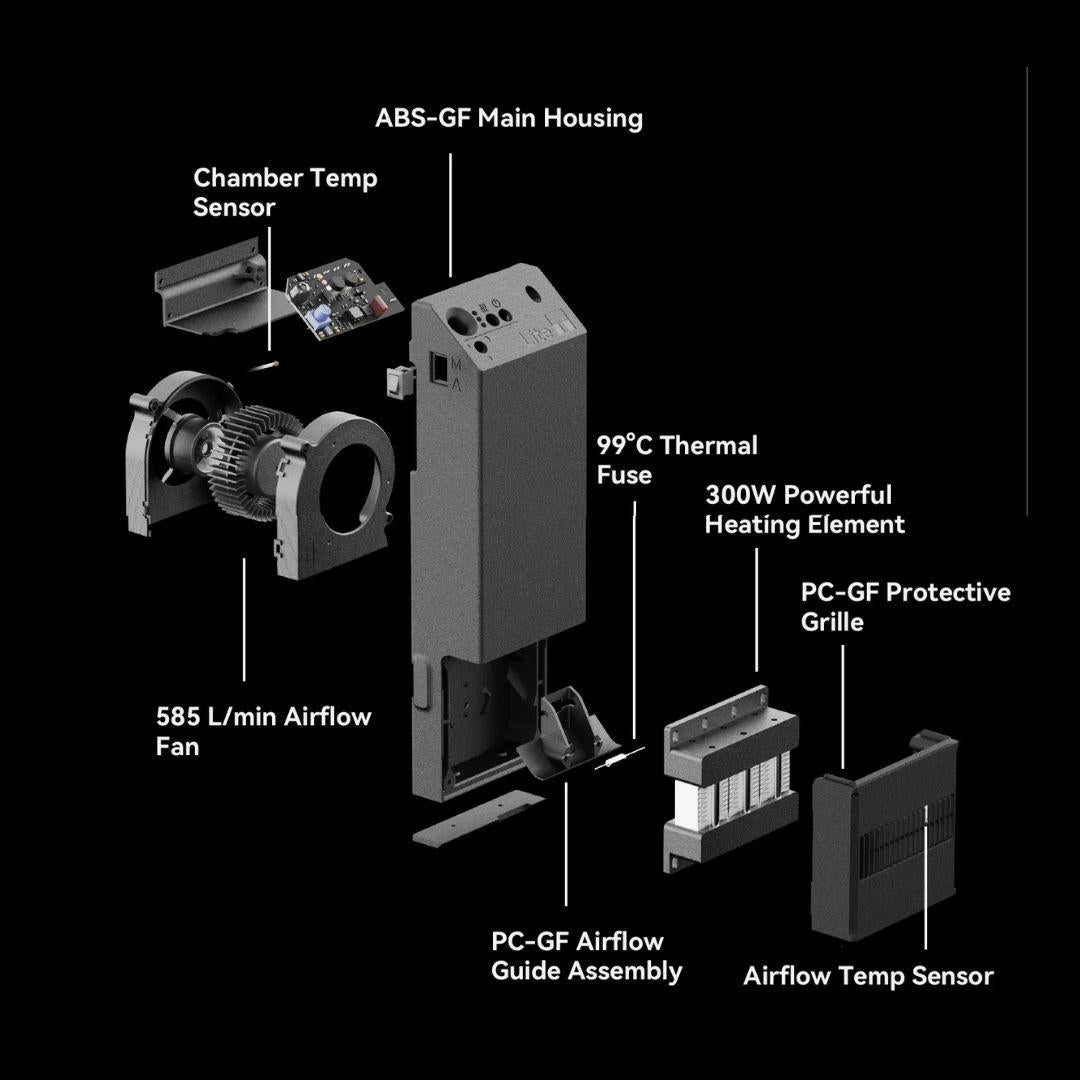
- Temperature Control: Adjustable 40–60°C (104–140°F); max chamber temperature 60°C; listed accuracy ±1°C (±1.8°F) on the M2; listed heat-up of about 10 minutes
- Operating Modes: M2 — heating with filtration, plus filtration-only cold-air mode; M2 Lite — hot air and fan-only cold air, no filtration
- Control: Infrared toolhead sensing with auto start/stop about 180 seconds after motion ends, plus manual start/stop; no Wi-Fi or app
- Power and Voltage: 300 W hot air, 18 W cold air, 0.6 W standby as listed; 110 V / 220 V versions
- Airflow and Noise: 585 L/min (20.7 ft³/min); listed ≤48 dBA door closed and ≤56 dBA door open
- Filtration: H13 HEPA and high-iodine, acid-free activated carbon (M2 only)
- Dimensions: 89 × 274 × 49 mm (3.5 × 10.8 × 1.9 in),
- Protection: Thermal runaway protection; outlet airflow temperature limit 100°C (212°F) on the M2 Lite and 105°C (221°F) on the M2 as listed
Package Includes
M2 (with purifier):
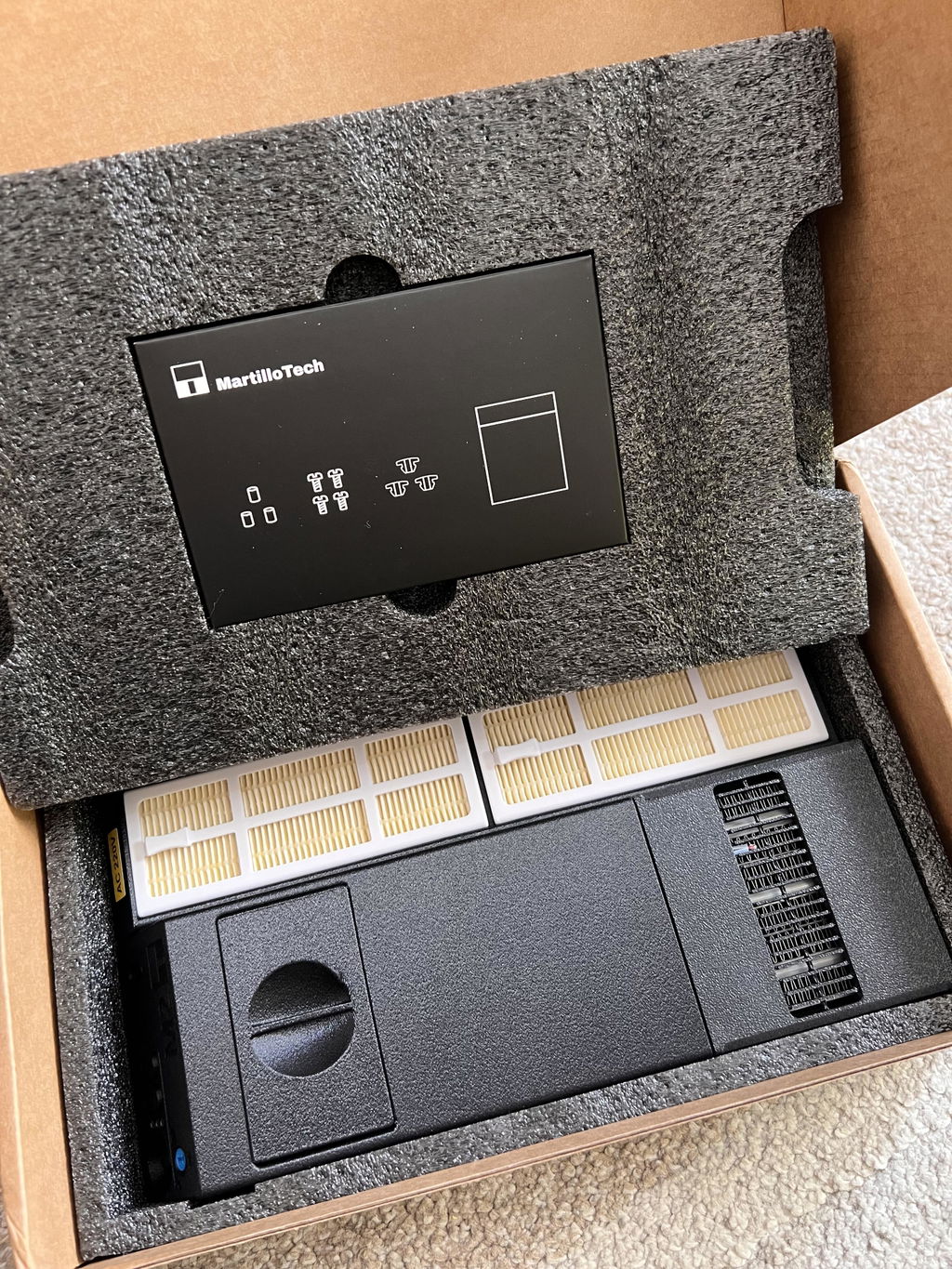
1 × MartilloTech M2 Chamber Heater with Purifier
3 × Anti-Vibration Silicone Gaskets
3 × Gasket Fastening Screws
1 × Heater Fastening Screw
1 × High-Iodine, Non-Acidic Activated Carbon
3 × Spare Screw Sets
M2 Lite (heater only):
1 × Chamber Heater M2 Lite
3 × Anti-Vibration Silicone Gaskets
3 × Gasket Fastening Screws
2 × Heater Fastening Screws
Not Included: activated carbon and filter module (M2 Lite has no filtration)
Requirements & Installation Notes
- Printer and Voltage: Use the P2S-specific version and select the voltage that matches your printer and local supply.
- Installation Work: Existing mounting points are used, but the rear panel must be opened and internal power wiring connected; this is not an external plug-in accessory.
- Power Safety: Disconnect the printer from power before installation. If you are unfamiliar with mains wiring, have a qualified technician perform the connection.
- Filter Setup: Fill the filter box with the supplied activated carbon before using filtration.
- Daily Use: Keep heating off for standard PLA/PETG, maintain room ventilation, and monitor initial prints after installation.
View the Complete P2S M2 Chamber Heater Installation and Air Purifier Guide →
Real-World Install & Test of M2 Chamber Heater for Bambu Lab P2S
P2S M2 Chamber Heater: The Setup Step Easy to Miss
The unit can be mounted and still not be ready to run. The guide shows where install order and the daily mode choice usually go wrong.
Closed Door, Warm Bed: Is the Chamber Actually Controlled?
Large ABS and ASA parts can still peel inside a closed printer. The article asks whether the chamber is controlled, or only borrowing heat from the bed.
MartilloTech Chamber Heater Review: Worth the Install?
Review-style buying guide for users printing PA, ABS, PC, CF/GF blends, and larger parts where warping or weak bonding is common.
Explore Precision Upgrades for Your Bambu Lab
Frequently Asked Questions About M2 Chamber Heater for Bambu Lab P2S
How warm does the P2S chamber get without an active heater?
In our tests, the P2S chamber typically reached around 30–35°C (86–95°F) when warmed by the heated bed alone, without a dedicated chamber heater.
Can I use a chamber heater when printing standard PLA or PETG?
No, you should turn off the chamber heater when printing low-temperature materials like PLA and PETG. PLA has a low glass transition temperature (~60°C); if the ambient chamber air gets too warm, the filament will soften prematurely inside the extruder, leading to heat creep and severe nozzle clogging.
Does automatic mode require Wi-Fi or an app?
No. Automatic mode uses IR toolhead sensing to follow printer activity without Wi-Fi or an app. The product listing specifies a 180-second shutoff delay after printing, and manual operation is also available.
Does the M2 use an external power plug?
No. The current P2S installation connects the M2 to the printer’s internal power wiring. Choose the correct voltage version and review the installation guide before ordering. The connection requires opening the printer; have a qualified technician handle it if you are not familiar with mains wiring.
Why Shop with Call3D ?
Buy with confidence from an experienced 3D printing team offering carefully selected products, clear compatibility guidance, responsive support, and transparent order fulfillment.
Store FAQ
What Should I Buy from Call3D?
Call3D is particularly valuable when you are looking for:
- Carefully selected third-party accessories, mods, and upgrades for Bambu Lab printers;
- Compatibility-sensitive parts that require clearer model, version, or installation guidance;
- Specialized solutions that may be difficult to identify on general marketplaces;
- Newly released or locally unavailable Bambu Lab products;
- Multiple accessories that can be combined into one order.
Every product we list is selected for a clear functional purpose, with compatibility, installation requirements, and known limitations reviewed before publication. Our goal is to help customers choose the right solution—not simply offer the largest possible catalog.
Why Call3D over a Marketplace?
General marketplaces may offer a large number of similar-looking products from different sellers, making it difficult to evaluate compatibility, product quality, and after-sales responsibility.
Call3D operates as a specialist curated store. We review a product’s purpose, compatibility, installation requirements, and available technical information before listing it. If customers need help before ordering or encounter a problem afterward, they can contact the same team that selected and documented the product.
We focus on long-term customer relationships, clear communication, and responsible after-sales support rather than a one-time transaction.
How can I track my order?
You will receive a YunExpress order number immediately after your order ships.Use this number to track the package from our warehouse to your destination country.
For the following countries, you will also receive a corresponding local tracking number.Please use the official website of the local carrier for real-time delivery updates:
- United States: USPS
- Germany & Netherlands: DHL
- United Kingdom: Evri
- Spain: CTT
- France: Colis Privé
For all other regions: Only a YunExpress tracking number will be provided (no local carrier tracking available).
Do you ship to my country?
Call3D currently serves customers in 36 countries and regions:
European Union: Austria, Belgium, Bulgaria, Croatia, Cyprus, Czechia, Denmark, Estonia, Finland, France, Germany, Greece, Hungary, Ireland, Italy, Latvia, Lithuania, Luxembourg, Malta, the Netherlands, Poland, Portugal, Romania, Slovakia, Slovenia, Spain, and Sweden.
Other destinations: Australia, Canada, Israel, New Zealand, Norway, Singapore, Switzerland, the United Kingdom, and the United States.
If your destination is not listed, please contact Call3D before placing an order. We will assess shipping availability, customs requirements, taxes, and applicable local regulations, then confirm whether we can serve your location. Delivery to an unlisted destination is not guaranteed until confirmed by our team.
What is your return policy?
Eligible unused items in their original condition and packaging may be returned within 30 days of delivery. Please contact Call3D for approval before returning an item. Refunds are issued to the original payment method after inspection; return shipping costs apply.
Duties, VAT & Sales Tax
Call3D product prices include applicable import duties. For orders delivered to the European Union, applicable VAT is also included in the displayed price. Customers should not normally be required to pay additional import duties or VAT upon delivery.
For orders delivered within the United States, applicable state and local sales tax is calculated based on the shipping address and displayed at checkout before payment. Call3D collects sales tax only in jurisdictions where it is required to do so under applicable tax rules. If no sales tax is shown at checkout, Call3D is not collecting sales tax for that order.
If you receive an unexpected request for import duties or VAT, please contact Call3D Support before making an additional payment.
Call3D Store & Service Reviews
-
I’ve known Enderwick since 2014 and worked alongside him for many years. With over a decade in the industry, he and his team bring an extremely high level of expertise.He has built an enormous 3D printing community here in China and is always coming out with new solutions—each one never fails to impress me.
Daniel O'ConnorDeputy Vice President of TCT Magazine -
When EP invited me to Shenzhen back in 2019, I was absolutely blown away by the hardware innovation coming out of China. Just one year later, Bambu Lab burst onto the scene—and their solutions have grown right alongside Bambu, evolving from the very beginning to where they are today.
Chris ConneryVP for Global Analysis at CONTEXT -
The support offered after i wrote about a defective product was nothing short of exemplary, i applaud Call3D and its support team who fixed my problem swiftly, and made sure to take notice!
Tommaso PasqualiOperational Quality Sterile Lead -
Decent and helpful staff - customer service is outstanding. Secure payment and fast shipping. The items are of great quality. Highly recommended!
Oliver FodorTechnical Manager -
Bought a ventilation system but changed my mind last minute. I thought returns would be a huge hassle, but they told me there’s a return warehouse in Houston only about a 10-minute drive from where I live in Missouri City. Drove over and returned it super easily. Super convenient return process, great experience overall!
RayRobertProject manager -
Found this shop on Reddit, chatted with a real person about the P2S filter I needed. Asked if they could ship to SG, they checked and made it happen! Super happy because this filter is basically impossible to find locally and always out of stock everywhere else. Fast, friendly, and solved my problem perfectly. Will buy again!
Ok_Government_1125Hobbyist in Singapore
- 5 stars: 9 (64%)
- 4 stars: 3 (21%)
- 3 stars: 0 (0%)
- 2 stars: 1 (7%)
- 1 star: 1 (7%)
The ABS-GF housing has a nice matte finish, and the overall design looks clean and refined. It fits into the printer very well without looking out of place. Installation was also fairly straightforward: mount the unit where the auxiliary part cooling fan was originally installed, remove the back panel, route the cable through the rear housing, and connect the live and neutral wires to the original AC board terminals. There are quite a few screws to remove, but the process itself is not difficult. The chamber heating performance met my expectations as well. Using the testing method from the manual, I was able to confirm that the chamber temperature can reach 60��C. In actual use, I printed PC without any warping issues. Overall, this is an excellent product.
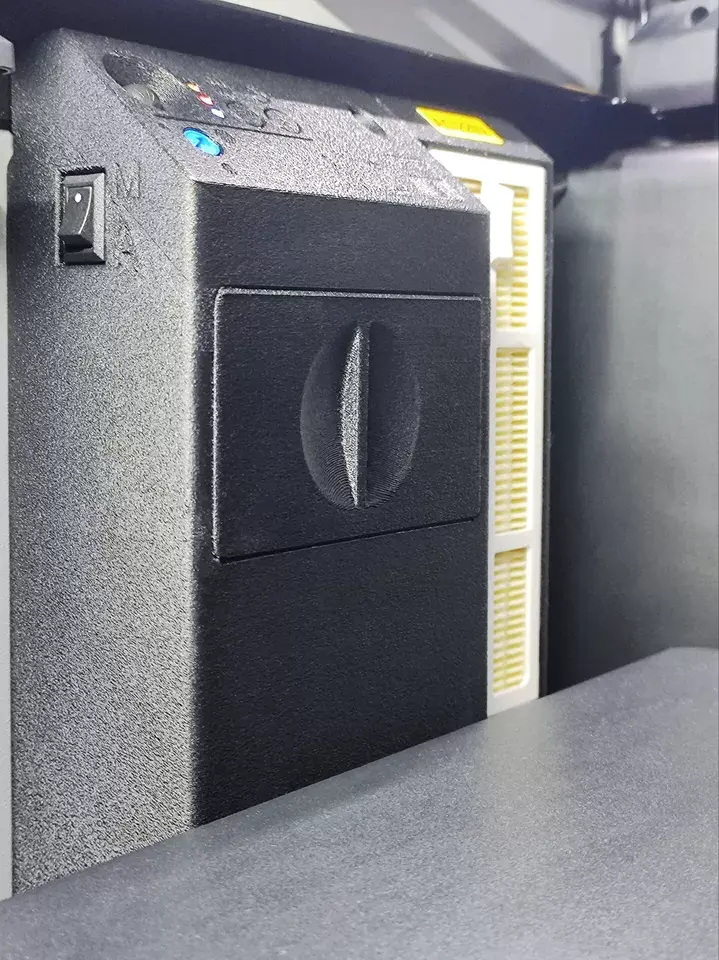
This chamber heater works extremely well. I honestly wish I had bought it sooner, because it has made a real difference with edge lifting and warping. The build quality feels refined, and for the price, it is absolutely worth it.
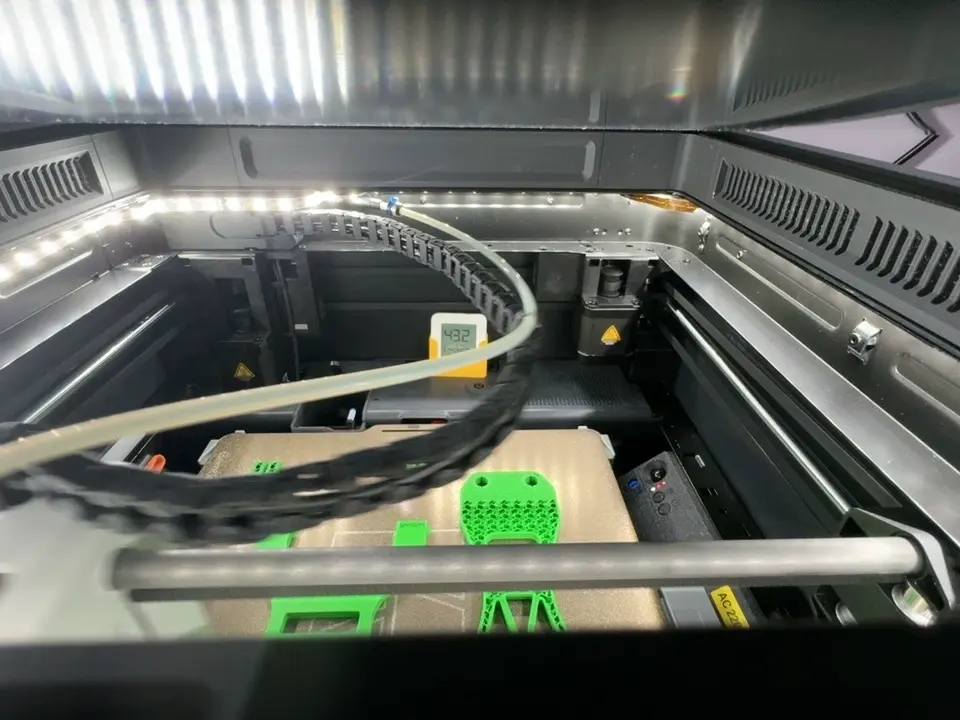
I had some edge lifting when I forgot to turn it on, but after cleaning the build plate and running the chamber heater, I printed several plates without any warping. The air purification feature is also very useful and helps reduce both odor and dust during printing.
Thank you for sharing your experience! We're glad to hear the chamber heater helped prevent warping and that the purification feature has been useful for reducing odor and dust.
Superb customer service, extremely fast shipping and delivery to Europe! I got the package in a meticulous condition. The item is packed nicely and has a great quality. The manual is very well detailed and provides clear instructions and know-hows for the proper assembly! And the package even includes the filters and the filter material. Recommended! Thank you very much!
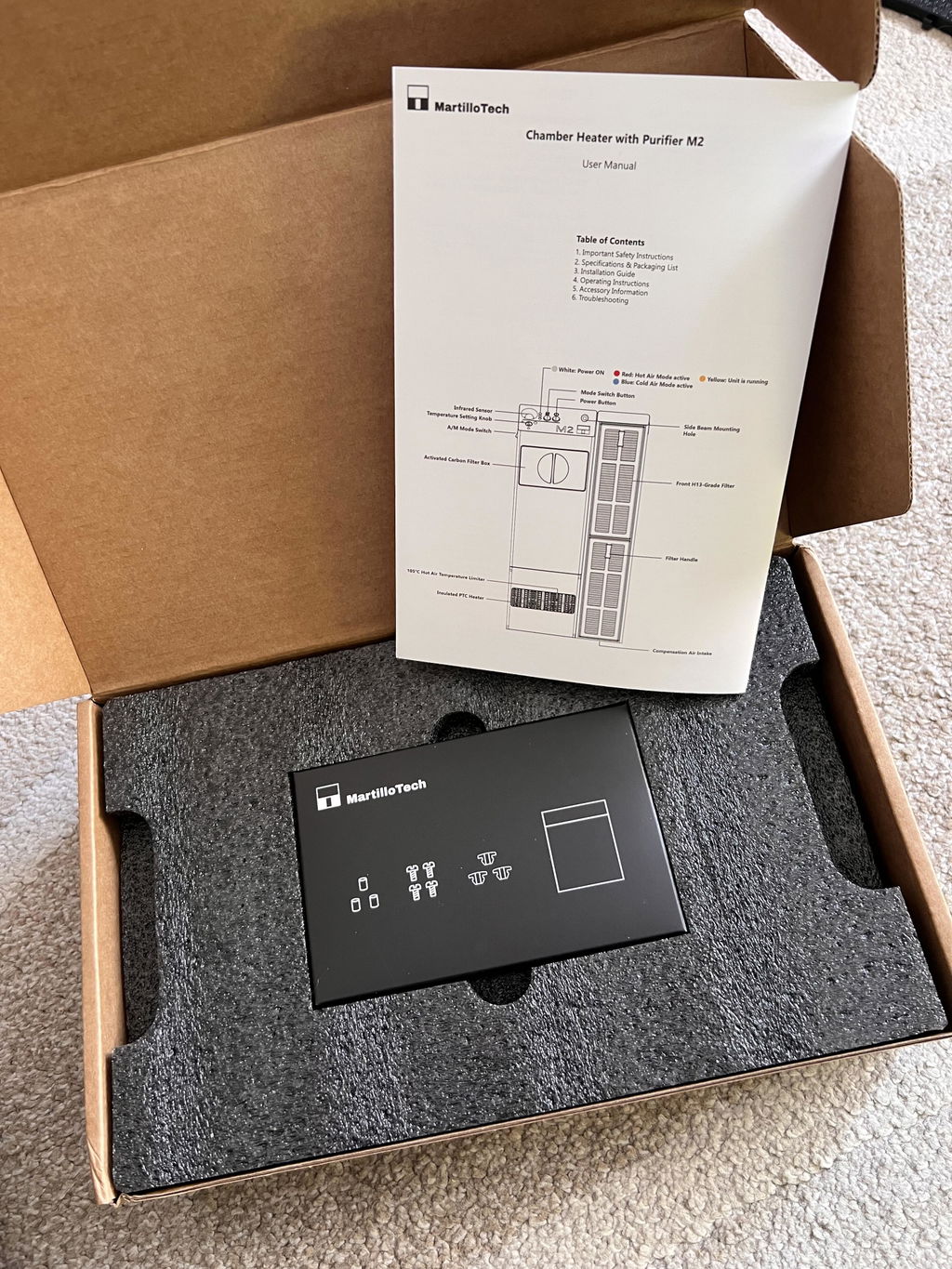
Just testing it out, mainly printing with PETG. With the height riser open for ventilation and the glass top riser, the temp stays around 40°C. Closing all vents brings it up to 43°C. It would be even better if the unit could automatically adjust temperature and switch between hot and cold airflow.
After a few days of use, the results are really good—especially in this cold winter weather. Looking forward to seeing how it performs in summer. Print quality is amazing thanks to the consistent temperature. Installation was fairly straightforward and easy, and the non-destructive mount is excellent. It uses all the existing holes on the machine’s side panels perfectly, no modifications needed. Super well-thought-out design, thumbs up 👍🏻👍🏻
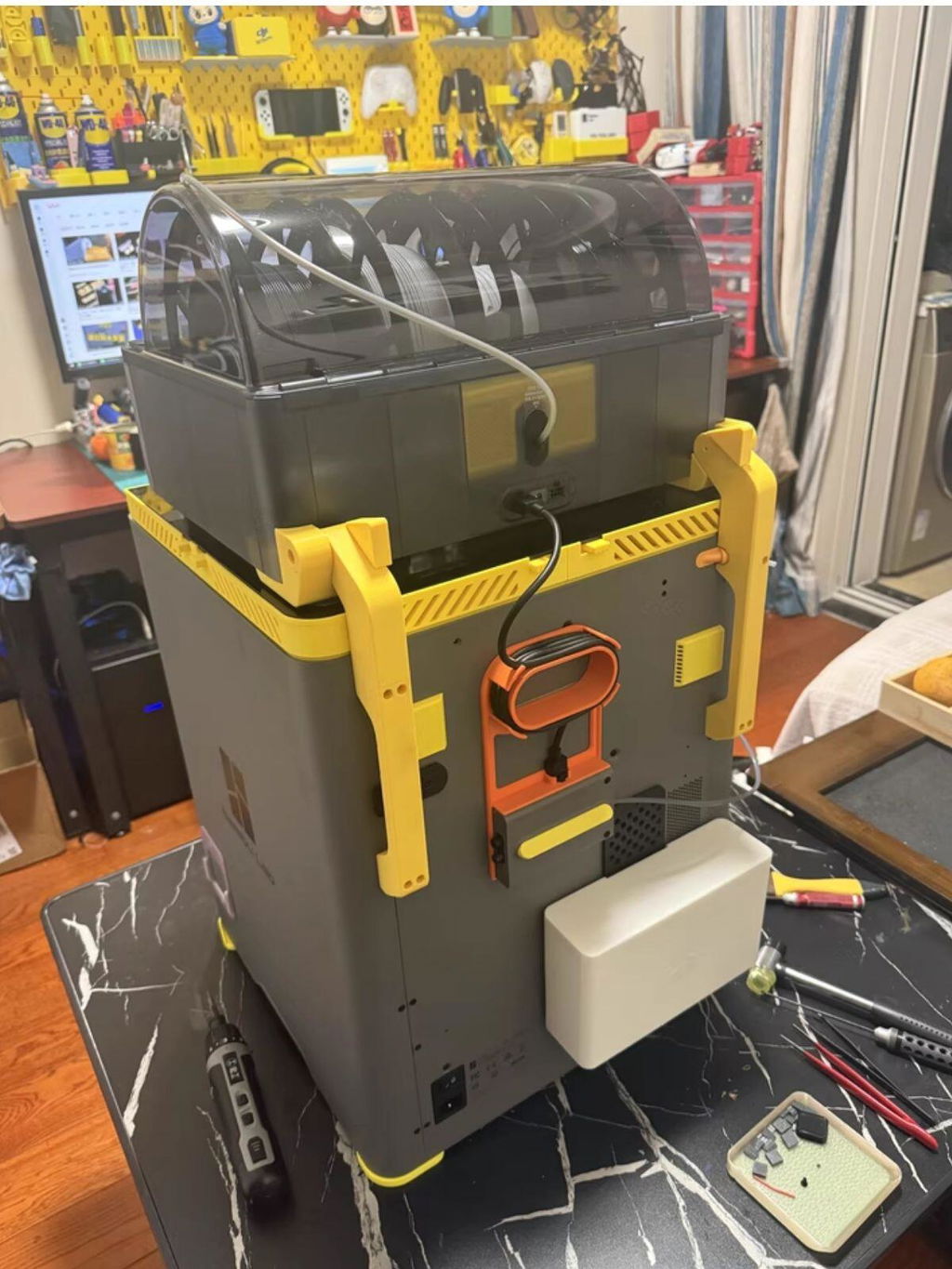
The official P2S lacks active chamber temperature control, which often leads to warping when printing engineering materials or large models. I saw MartilloTech’s P2S active chamber temperature kit was available, so I grabbed it right away to test. I also reinstalled the official exhaust fan backplate at the same time.
Installation isn’t too complicated—just follow the instructions. Once fitted, it doesn’t interfere with normal printer operation. In use, the blue light means cold air (perfect replacement for the stock left fan), and red light means hot air. Testing shows even heat distribution throughout the chamber and fast heating, making winter printing smooth and reliable.
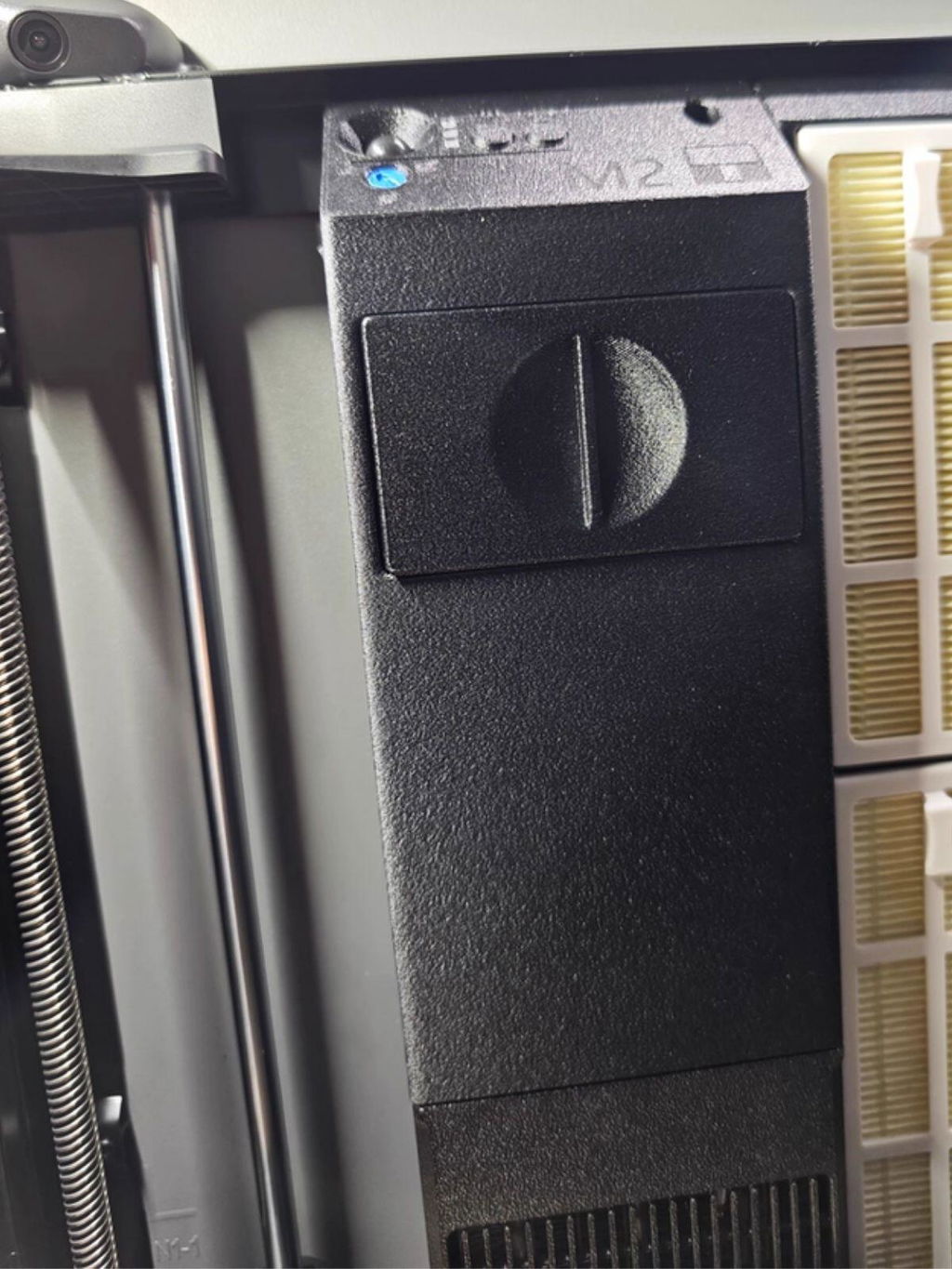
Installation isn’t hard if you follow the tutorial step by step—just take your time and be careful.
Watch your wiring closely, otherwise it can get tangled with the hot bed cables and cause issues when the bed moves up and down.
Other than that, it’s really convenient to use. It even senses when printing starts and stops automatically.
Parts that used to warp really badly now have way less warping once I turn it on.
I installed a chamber heater and air filter on my P2P, and I seriously regret not doing it sooner!
The smell from printing ABS used to be absolutely choking, but now I don’t smell any fumes at all with the door closed, and all the dust and particles get filtered out completely.
On top of that, it maintains stable chamber temps, so my prints don’t warp anymore.
This upgrade completely maxed out my printing experience — total game-changer!
The biggest issue with printing large PETG and ABS parts on my new Bambu Lab P2S is warping. Even with a thick PEI plate, big parts still warp badly.
I originally wanted to DIY a chamber heater and temperature control, but I didn’t have time to mess with it, and I also cared about ease of use and safety. So I decided to go with a ready-made kit instead.
The Martillo unit is compact, easy to install, and keeps the chamber temperature stable. I’ve printed several large parts with almost no warping at all.
works& great. fixed warping issues with abs that were causing prints to lift and layer issues.
This updated review notes that the heater functioned for only six hours before a thermal fuse failed. Customer service reached out through the initial review and provided a new thermal fuse and fan. The parts arrived fairly quickly; I was occupied with work and installed them this weekend. Performance improved noticeably from those first six hours, making a significant difference for printing engineering filaments. I just completed a PPA-CF print, which turned out excellent. I appreciate the replacement parts; assembly involved only screws and plugs—no soldering—but routing the wires proved quite challenging.
Thank you for updating your review and giving us the opportunity to put things right. We’re glad to hear the heater is now performing much better and that your print turned out so well. Thank you also for pointing out the difficulty with routing the wires—we’ll use that feedback to improve our installation guidance. If you need any further help, please reach out. We’re here to support you!
The chamber heater works well and the build quality feels great. I tested the chamber temperature and it stayed above 55℃, although it did not quite reach 60℃. Overall, it is still a useful upgrade and helps create a more stable printing environment.
Thank you for your honest feedback! We’re glad to hear you are happy with the build quality and overall performance. Chamber temperature can vary depending on the printer setup and environment, but we appreciate you sharing your real-world results.
It worked great for 6 hours it kept the P2S at 63 degrees instead of 60 which set off MC Module warning then after 6 hours it just died best ASA print i ever did with the P2S but the quality of there products is junk I ordered a cheap generic with digital control the 3 heat temperature sucks 40-45-60 the filament cooler was DOA stay away from Martillo expensive junk that doesn’t work
Hi Todd, we're sorry to hear about your experience with the P2S Chamber Heater M2. We take product quality very seriously, and we'd like to get to the bottom of this. We'll have our engineering team look into what may have caused the unit to fail. If it turns out to be a product defect, we will coordinate with the manufacturer for a replacement or compensation. We have sent you a email to keep follow up this case. Thank you for your honest feedback.
You don’t need all that. Just switch to a smooth build plate, set your temperature above 65°C, and keep an eye on chamber temps during winter. Sealing up the A1 the same way works perfectly fine too — it’s more than enough for printing PETG.
If you’re serious about consistent chamber temperature control, just get the H2S. It’s basically a simplified version of the H2D, but it’s fast, reliable, and ultra-precise. It’s a bit pricey, but it’s a one-time investment.
I’ve had zero failed prints with the H-series so far. Printing with them is stress-free — no worrying about hardware issues, and ABS success rate is 100%.
M2 / M2 Lite P2S Chamber Heater
- Bambu P2S
The MartilloTech P2S chamber heater line fits the Bambu Lab P2S in two versions: the M2 with an H13 HEPA and activated carbon air purifier, and the M2 Lite without filtration. Both add active 40–60°C (104–140°F) temperature control to an enclosure that otherwise only holds heat from the bed, so ABS, ASA, PC, Nylon, and PA-CF parts see less uneven cooling, warping, and layer splitting.
The heater, mounting points, and controls are shared. IR toolhead sensing starts the unit when the toolhead moves and stops it after the listed 180-second delay once printing ends, with no Wi-Fi or app needed, and manual modes remain available. On the M2, the filtration module runs together with heating or alone in cold-air mode to capture particles and reduce odors during ABS prints; on the M2 Lite you get the same chamber heating with no filter to fill or replace.
Both versions use the existing P2S mounting points but require opening the rear panel and connecting internal power wiring, so plan a bench install and pick the 110 V or 220 V version that matches your supply. Keep heating off for standard PLA and PETG, and keep the room ventilated even when the M2's filtration is running.
- Printer and Voltage: Use the P2S-specific version and select the voltage that matches your printer and local supply.
- Installation Work: Existing mounting points are used, but the rear panel must be opened and internal power wiring connected; this is not an external plug-in accessory.
- Power Safety: Disconnect the printer from power before installation. If you are unfamiliar with mains wiring, have a qualified technician perform the connection.
- Filter Setup: Fill the filter box with the supplied activated carbon before using filtration.
- Daily Use: Keep heating off for standard PLA/PETG, maintain room ventilation, and monitor initial prints after installation.
View the Complete P2S M2 Chamber Heater Installation and Air Purifier Guide →
- Product Type: Active P2S chamber heater; M2 adds H13 HEPA and activated carbon air filtration
- Compatible Printers: Bambu Lab P2S
- Temperature Control: Adjustable 40–60°C (104–140°F); max chamber temperature 60°C; listed accuracy ±1°C (±1.8°F) on the M2; listed heat-up of about 10 minutes
- Operating Modes: M2 — heating with filtration, plus filtration-only cold-air mode; M2 Lite — hot air and fan-only cold air, no filtration
- Control: Infrared toolhead sensing with auto start/stop about 180 seconds after motion ends, plus manual start/stop; no Wi-Fi or app
- Power and Voltage: 300 W hot air, 18 W cold air, 0.6 W standby as listed; 110 V / 220 V versions
- Airflow and Noise: 585 L/min (20.7 ft³/min); listed ≤48 dBA door closed and ≤56 dBA door open
- Filtration: H13 HEPA and high-iodine, acid-free activated carbon (M2 only)
- Dimensions: 89 × 274 × 49 mm (3.5 × 10.8 × 1.9 in),
- Protection: Thermal runaway protection; outlet airflow temperature limit 100°C (212°F) on the M2 Lite and 105°C (221°F) on the M2 as listed